You run the risk workshop. SafeForge deletes the friction and beams a live bow-tie to your stakeholders. Decisions logged, actions tracked, rejection justifications recorded.
The method
Five steps, built on good international practice
SafeForge has developed a five-step risk workshop model, based on good international practice. It follows the stages of the IEC 61882 study procedure — definitions, preparation, examination, and documentation and follow-up — with the last stage split in two.
- Frame — what are we risk assessing?
- Prep — an internal session to prepare the bow-ties.
- Room — the formal risk workshop.
- Commit — the agreed results go into your hazard log.
- Close-out — every action gets an owner and a date, and is tracked to done.
1 — Frame
Frame sets out what the workshop is assessing and what it is working from. It is the scope the room agrees before anyone starts on risks.
- What are we assessing? Purpose, scope, boundaries and objectives, dated.
- What are we working from? Drawings, procedures, design documents and references — pulled from your connected SharePoint or dropped into the chat.
- Your SafeForge agent fills it in from what you tell it — as much or as little as the workshop’s formality needs. Anything it writes stays marked as AI until you confirm it.
Practice anchors — IEC 61882 §6.2 Definitions · ISO 31000 §6.3.2 · CCPS GHEP Ch. 2.
2 — Prep
Prep is an internal session to build the bow-ties before the formal workshop. The room’s time then goes on judgement, not typing.
- Start from what you know — the risk, and the controls already in your hazard log, found and linked rather than re-typed.
- Ask your agent over the SafeForge connection to run a literature review, compare against good practice, and suggest risks, threats and controls.
- Prototype fast — drop meeting minutes, queries or a verbal request to your approved agent and it drafts onto the sheet for you to review.
- The bow-tie updates live — share it and your stakeholders watch it take shape.
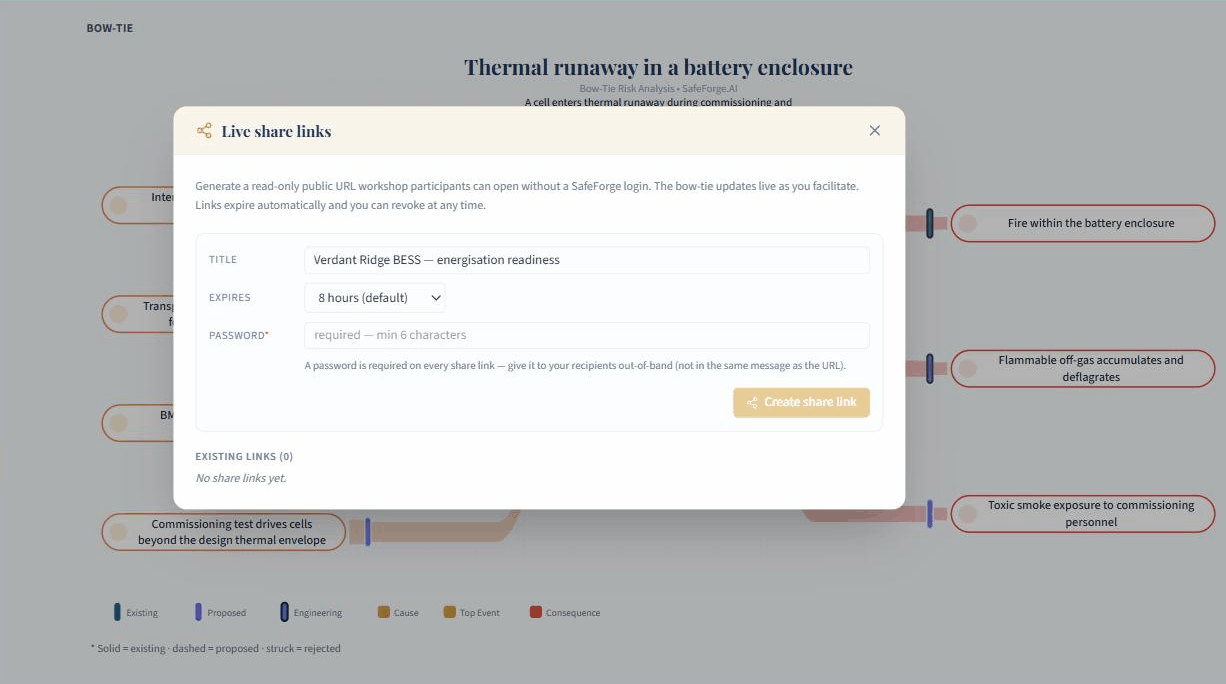
Practice anchors — IEC 61882 §6.3 Preparation · IEC 31010 Annex B.1.4 (nominal group technique).
3 — Room
Room is the formal risk workshop: the team works through each bow-tie and agrees it. SafeForge does not mandate it — make it as formal as the workshop needs.
- Record key positions as the room reaches them.
- Mark each control accepted, explore further, or rejected — with the reason.
- Record decisions on the sheet; agreed items lock so nothing moves under anyone.
- Put the live bow-tie on screen — everyone, in the room or remote, sees it update.
- Your agent stores the minutes and links in live actions from your log.
Practice anchors — IEC 61882 §6.4 Examination · ISO 45001 §5.4.
4 — Commit
Commit moves the workshop’s agreed results into your hazard log. Someone other than the author checks them before they count.
- One change request carries the whole workshop into your log through the same change-request system as every other change — no export file, no re-keying.
- Everything lands linked — each cause, control and consequence tied to its hazard.
- A second person approves — another engineer on Team projects; on a Solo project, the person who accepts the agent’s change request.
- Rejected controls are kept, with their reasons.
Practice anchors — IEC 61882 §6.5.5 sign-off · MIL-STD-882E §4.3.7 · EN 50126-1: the hazard log under configuration control.
5 — Close-out
Close-out finishes the job: every action gets an owner and a due date. The workshop is done when its actions are tracked, not when the meeting ends.
- Actions drafted from the room’s raw material — hand transcripts and notes to your agent, then review each action before it stands.
- Owners and due dates on every action, tracked against your log as it progresses.
- The engineer writes the rationale — the AI can gather evidence, never the conclusion.
Practice anchors — IEC 61882 §6.5.6 · CCPS GHEP Ch. 8 · HSE template: owner and date for every action.
The engineering
How the agent is kept in its lane: five steps, one state machine
Under the hood, the Workshop Copilot is a state machine. The five steps are its nodes — units of work with defined inputs and outputs; the moves between them are its edges, and every edge is gated. Steps 2 and 3 form a deliberate cycle (the same work at two levels of formality), and the only edge into your hazard log runs through Commit. The agent-engineering world is converging on a name for building assistants this way — graph engineering: structuring an agent’s work as an explicit graph of governed steps, rather than an open-ended loop steered by a clever prompt. The term is young, and to be clear about which graph we mean: this is the workshop’s execution structure, not a knowledge-graph claim.
What the discipline gets right — and what we built before it had a name — is where the rules live. The dogma’s limits are not instructions we hope a model follows; they are properties of the nodes and edges themselves:
- 1 — Frame: the node accepts assistant writes, but they land flagged as unconfirmed AI — rendered red until a person confirms them.
- 2 — Prep: the assistant’s proposals stage into a held layer — server-enforced, invisible to every room-facing surface, including the live share.
- 3 — Room: the node narrows the agent to advice-only: proposals queue in a review side-channel, never on the sheet; agreed items lock; there is deliberately no accept-all.
- 4 — Commit: the one edge into the record — a single change request per workshop, relationships applied only on human approval, and a reviewer who is never the author.
- 5 — Close-out: the assistant drafts from transcripts; conclusions are human-authored; every AI write carries provenance — who, what, when, which function.
The same structure scopes what the agent can even reach: every tool on the SafeForge connection is classed by its gate — read, staged, presentation, or change-request-gated — the surface is hard-capped, and a server-side filter blocks legal-verdict language from any output. Because the limits are in the graph and the tools rather than in any model’s instructions, they bind whichever assistant connects — swap the model, bring your own; the nodes, the gates and the filter are still there. Governance as structure, not prompt: that is what lets an agent be trusted near a risk workshop at all.
Each step’s working rule — and the principle it enforces
Every rule above is code and process, not model behaviour, and each enforces one of our six founding principles:
| Step | The rule doing the work | Active AI Dogma Principle |
|---|---|---|
| 1 — Frame | AI drafts are preview-only; every drafted field carries its own Use button, pressed by a person; assistant-written text is marked as AI until confirmed | 1 — AI empowers, never decides with 2, 3, 5 |
| 2 — Prep | Elicitation-first: AI output is held — server-enforced, absent from every room-facing surface, including the live share | 1 — AI empowers, never decides with 2, 3, 5 |
| 3 — Room | AI proposals land in a review side-channel, never on the sheet; locked items are refused; deliberately no accept-all | 4 — authority never transfers |
| 4 — Commit | The change-request gate: per-item human acceptance, a reviewer who is never the author, provenance on every AI write | 6 — AI does not bypass safety process |
| 5 — Close-out | The verdict filter: SFAIRP/ALARP/compliant conclusions are blocked server-side; rejection conclusions are human-authored | 4 — authority never transfers |
References
Access date 25 August 2026; citations re-verified 4 September 2026. Standards cited by clause were verified against publisher previews, full public texts, or the named secondary source.
- IEC 61882:2016, Hazard and operability studies — Application guide — IEC webstore; §6.5.5 sign-off content per Primatech’s published comparison.
- ISO 31000:2018 — ISO · IEC 31010:2019 — IEC webstore.
- CCPS, Guidelines for Hazard Evaluation Procedures, 3rd ed. — AIChE/CCPS.
- CCPS & Energy Institute, Bow Ties in Risk Management — Wiley; workshop practice per Manton et al., Hazards 27 paper (2017).
- MIL-STD-882E w/Change 1 — full text, US DoD.
- EN 50126-1:2017 (+A1:2024) — the hazard log as a configuration-controlled record.
- ISO 45001:2018 — ISO.
- UK HSE — Managing risks and risk assessment at work + template.
- Tversky & Kahneman (1974), Science 185(4157) · Cetin-Sahin et al. (2024), Ann Fam Med 22(6) (NGT).
- Risktec, workshop scribing · ORS Consulting on bow-tie workshops.
SafeForge’s AI can make mistakes. It is a supplement to the engineer’s decision, never a substitute for it, and the six principles of the SafeForge AI Dogma are what keep it that way: its findings inform judgement, they are never a legal or regulatory verdict, and every determination remains the duty-holder’s.
Ready to try SafeForge?
Start your intelligent hazard management workflow with a 14-day free trial — all features included, cancel anytime.